
Data Science
UTM Tracking 101: Best & Worst Strategies For Self Storage Operators
What if you're spending thousands on ads but have no idea which ones actually fill units?
Most self-storage operators know their marketing budget down to the dollar.
Ask them which specific campaigns are driving rentals... and you'll get silence.
“Google Ads costs $3,000 a month. Facebook campaigns are active. There's a billboard on Route 7 that seemed like a good idea at the time.”
The problem is, when someone reserves a unit, they have no clue which touchpoint actually convinced them to rent.
With a some help from our friends at StoragePug, I'm going to show you how to end this guessing game with UTM tracking.
A UTM is a tiny piece of code you add to your marketing links. They tell you exactly where a marketing lead came from and can store information on specific campaigns - promos, referrals, discounts - so you better spend your money on what works.
Right now, you're essentially marketing blind. Once you start tracking properly, you'll finally see which ads fill units and which ones just look cool.
If you're tired of wondering whether your marketing actually works, keep reading. I'll show you how operators are using UTM tracking to cut waste and double down on what converts.
Why Most Operators Are Flying Blind With Their Marketing Budget
Ads are running on Google, Facebook, and maybe some local directories.
A potential tenant calls or visits your website and books a unit…
But there's no way to confirm which ad caught their eye.
Did they click your Facebook post or your Google search ad? Was it because you offered a month free? or Did you try to market to college students and it worked?
That $500 you spent on Yelp might have driven zero rentals for all you know.
This is where most facilities get stuck. Marketing clearly matters, but connecting dollars spent to units filled remains impossible.
Google Analytics tracks traffic and your property management system records rentals…
Social media and paper ads might be working but hard to tell.
I've watched operators struggle with this for years. It’s frustrating to see.
UTM tracking fills that gap and connects the dots between ad spend and actual revenue.
What UTM Parameters Actually Do (And Why You Should Care)
UTM parameters are tags you add to the end of your links.
When someone clicks a link with these tags attached, they travel along for the ride. Google Analytics sees them and records exactly where that visitor came from.
Here's what a UTM-tagged link looks like:
yourfacility.com/units?utm_source=facebook&utm_medium=paid&utm_campaign=spring2026
That link tells you the visitor came from Facebook, through a paid ad, as part of your Spring 2026 campaign.
Right now, Google Analytics just sees "someone visited from Facebook." Add UTM tags and the specific ad that brought them in becomes visible.
There are five UTM parameters:
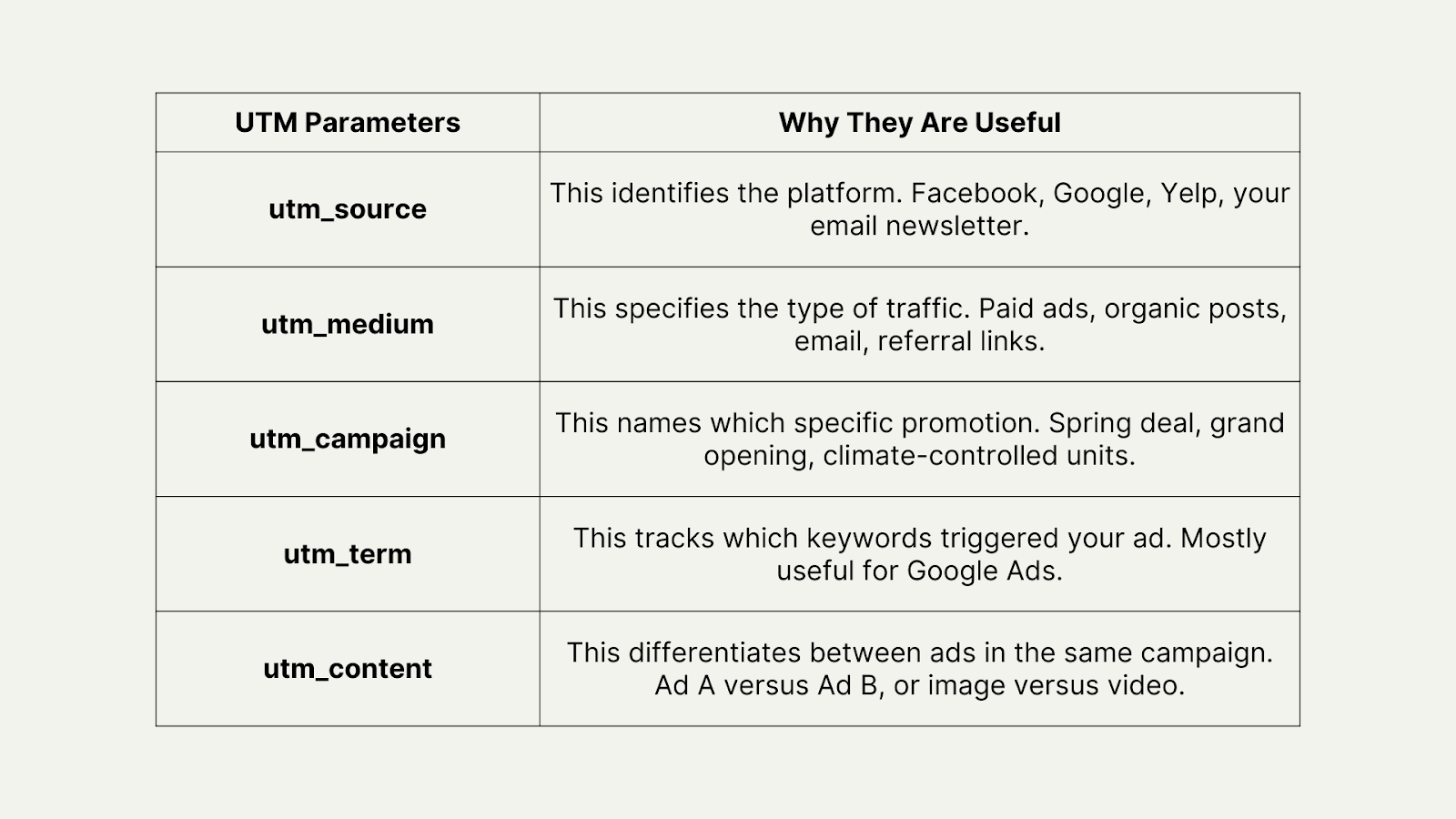
I think people often forget that you don't need all five for every link. Most operators stick with source, medium, and campaign.
The Tracking Mistakes That Make Your Data Useless
I see facility teams who start using UTM tracking often making the same mistakes.
Yes, there's some enthusiasm at first. A few links get tagged. Then inconsistency creeps in, things get forgotten and tagging happens randomly…
Six months later, Google Analytics is a mess. Half the data is missing and the other half makes no sense.
From what we’ve seen, here are the mistakes that ruin everything:
Inconsistent naming
One link says utm_source=Facebook, another says utm_source=facebook, and a third says utm_source=FB.
Google Analytics treats these as three different sources, which fragments your data into useless pieces.
Forgetting to tag links
Facebook ads get tagged, but email doesn't. This makes knowing if newsletters are working impossible!
Using spaces or special characters
UTM parameters need hyphens or underscores. Don’t add spaces!
"spring promo" breaks things.
"spring-promo" works perfectly.
Tagging internal links
Never put UTM parameters on links going from one page of your site to another. This resets the visitor's source and destroys everything.
Not documenting your system
Three months from now, remembering whether you used "google-ads" or "google_ads" or "GoogleAds" will be impossible. I've noticed that operators who skip this step always regret it later.
“Tracking your website metrics should be more than just traffic and source. You need to know how your visitors are interacting with your site – how long are they browsing, what pages are they visiting, and, most importantly, are they renting a unit? If you don’t have proper tagging across every step of your site, you’ll miss the full picture.”
- Tyler Anthony, Head of Growth @ StoragePug
Build A Naming Convention That Actually Works
Before tagging a single link, you need rules!
Pick your naming style and never deviate. Here are my three rules:
- Lowercase only
- Hyphens instead of spaces
- Consistent abbreviations
This is what works for most operators…
For source, use the platform name exactly as it appears: facebook, google, yelp, newsletter, billboard.
For medium, pick from a short list: paid, organic, email, referral, social, display.
For campaign, describe what you're promoting: spring-2026, climate-controlled, new-location, first-month-free.
I recommend writing these down where your whole team can see them. You should update them when adding new campaigns.
When everyone follows the same system, data stays clean. I've always found that clean data means being able to actually trust what you're seeing.
Which Links Actually Need UTM Tracking
I don’t want you to start tagging every link on the internet. It’s unnecessary.
You should focus on external sources that bring people to your website. These matter for understanding where traffic originates.
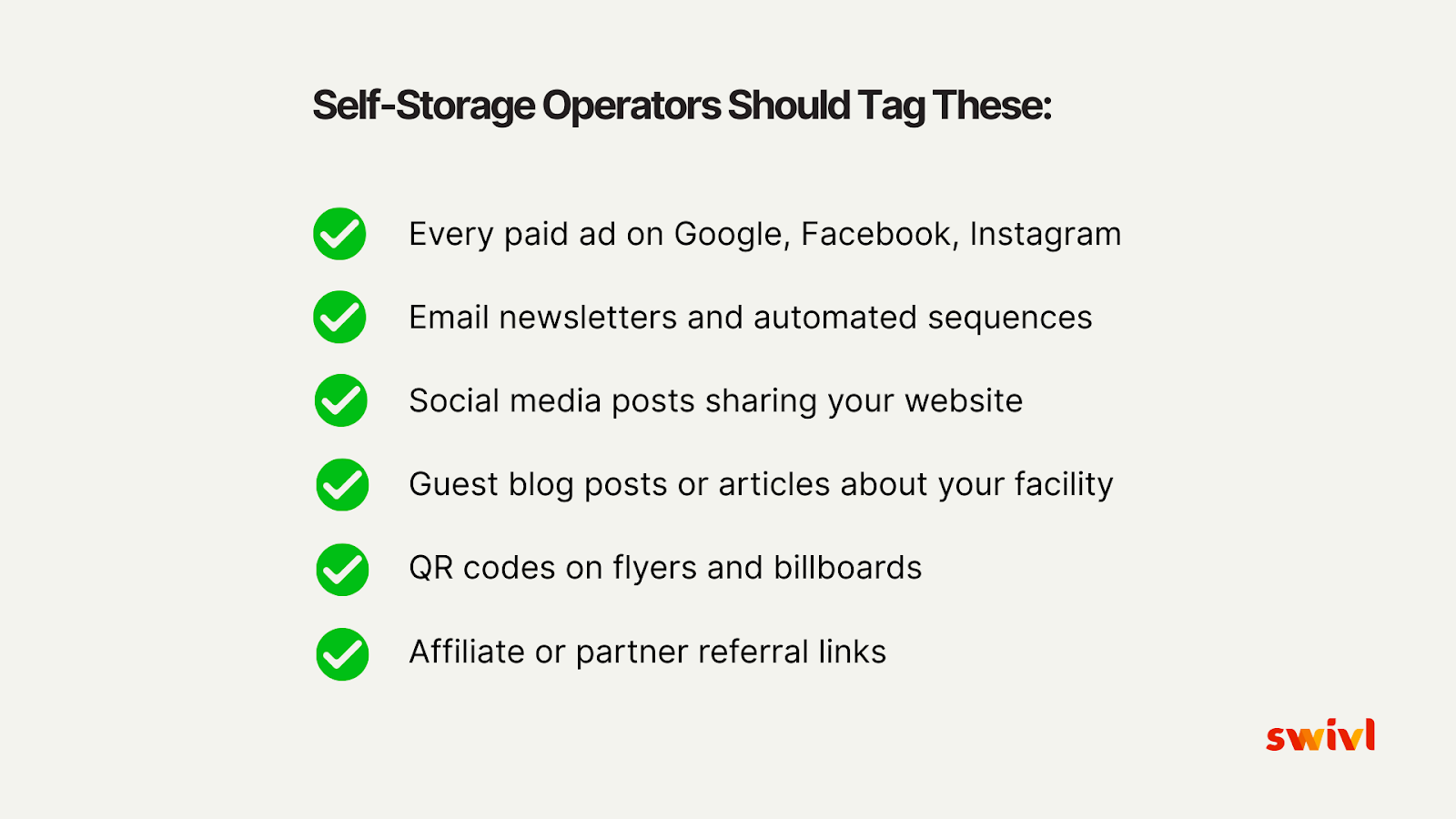
Tag these:
- Every paid ad on Google, Facebook, Instagram, Yelp, or any other platform
- Email newsletters and automated sequences
- Social media posts sharing your website
- Guest blog posts or articles about your facility
- QR codes on flyers, billboards, or direct mail pieces
- Affiliate or partner referral links
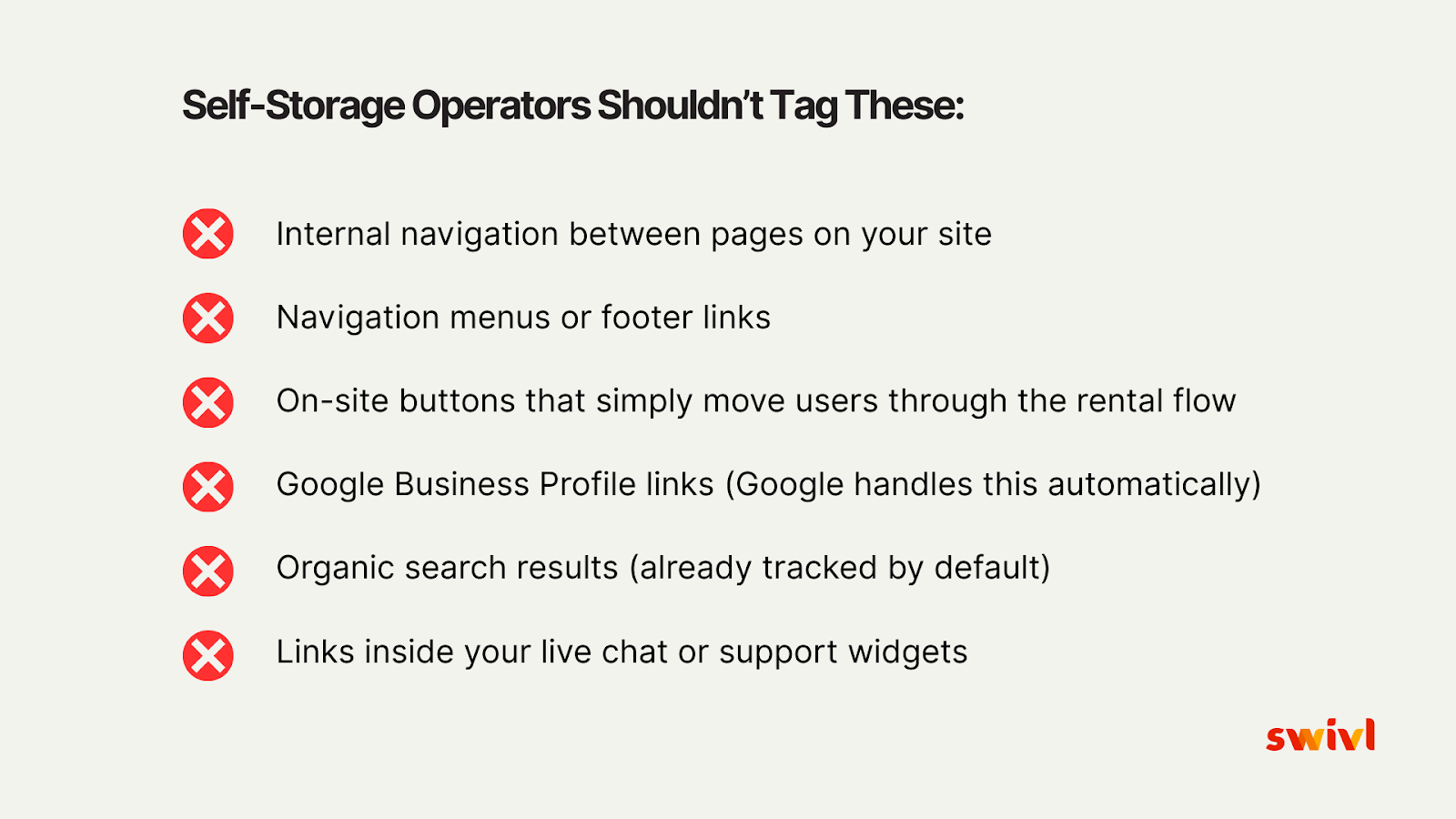
Don't tag these:
- Internal navigation between pages on your site
- Google Business Profile links (Google handles this automatically)
- Organic search results (already tracked by default)
- Navigation menus or footer links
The goal is tagging external traffic sources so seeing which marketing channels drive visitors becomes possible.
Actually Using The Data To Make Smarter Decisions
UTM tracking is pointless if the data never gets reviewed.
Once links are tagged and traffic is flowing, I want you to start checking Google Analytics regularly.
Go to Reports, then Acquisition, then Traffic Acquisition. A breakdown appears showing where visitors are coming from, sorted by source and medium.
Look for patterns! Maybe Facebook ads are getting lots of clicks but zero reservations.
Email newsletters might drive fewer clicks but higher conversion rates. That Yelp sponsorship could be sending almost no traffic.
This is where I've seen operators have their biggest breakthroughs. Decisions based on facts instead of hunches become possible.
If your Facebook ads aren’t converting, test different copy or target a new audience.
When emails aren’t crushing it, tweak the copy and send more.
Yelp dead? Cancel it and redirect that budget somewhere more useful.
When I speak with operators who actually use their UTM data, they report cutting wasted spend while increasing rentals from channels that actually work.
Tools That Make UTM Tracking Less Painful
Building links by hand gets old pretty fast!
I’ve found that trying to remember if you used hyphens or underscores becomes tedious.
Second-guessing campaign names happens constantly and typos that break everything are inevitable…
I recommend using a UTM builder tool.
Google has a free Campaign URL Builder that does the heavy lifting.
Once you fill in the fields, it generates the tagged link. You can then copy this link into your ad or email.
I'm usually a fan of keeping a spreadsheet with all your tagged links. Every new campaign gets a row with the link, campaign details, and date. This makes referencing old campaigns and staying consistent easy.
If you’re using swivl for lead tracking, UTM data can integrate directly into the CRM. When a prospect converts, the exact campaign that brought them in appears... right alongside their conversation history and unit preferences.
This closes the loop. The campaign that drove the lead becomes clear, along with what questions they asked and whether they rented.
Questions I’m Often Asked About UTM Tracking
When I speak with facility teams, they often ask the following questions about UTM tracking:
Do I need to tag links on my Google Business Profile?
No, Google already handles traffic from your Business Profile automatically. Adding UTM parameters here can actually mess things up.
Can I use UTM tracking for offline marketing?
Yes! Create a unique landing page for each offline campaign, then use UTM-tagged links in QR codes.
When someone scans the code, exactly which billboard or mailer drove them to your site becomes visible.
What if I'm running the same ad on multiple platforms?
Use identical campaign names but different sources.
utm_source=facebook and utm_source=google with utm_campaign=spring-2026 for both.
This lets performance comparison across platforms happen.
How long should I keep using the same campaign name?
As long as the campaign runs. I think it's worth remembering that using the same campaign name the entire time lets you see total performance.
Can I change my UTM parameters after I've started tracking?
Changing them is possible, but historical consistency gets lost. If something must change, document when and why so remembering the data shifted becomes easier later.
I Want You To Start Small, Then Scale Your Tracking
Trying to tag everything on day one is a mistake. You should pick your biggest marketing channel and start there.
If you’re spending most of your budget on Google Ads, tag those links first. Once you’ve tagged one campaign completely, make sure the data appears correctly in Google Analytics. Verify that seeing where traffic comes from works properly.
You can then add the next campaign. Then another...
Within a month or two, you’ll have clean tracking across all major channels.
It’s great to see operators commit to consistent UTM tracking. they can start making better budget decisions within a matter of weeks.
Are you interested in seeing how swivl can help connect UTM data to actual conversions and track every lead from first click to signed lease? Book a demo with our team today.
.jpg)


.jpg)